

You are using an out of date browser. It may not display this or other websites correctly.
You should upgrade or use an alternative browser.
You should upgrade or use an alternative browser.
Tomtom route planner
- Thread starter Tnja
- Start date


- Joined
- Oct 21, 2025
- Messages
- 29
- Location
- Toulouse
- Country

- TomTom Model(s)
- TomTom App Iphone TomTom Go Expert Camper Max
I’ve signed out and signed back in several times: no change (and, yes, I’ve made sure I’m using the same account on plan.tomtom and on my Camper…).
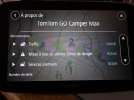
I don’t see any option that lets me know if MyDrive is enabled on my Camper… In Settings/System/About, I have the three checkboxes for Traffic, Hazard Area Updates, and Premium Services enabled…
Settings/Bluetooth clearly shows that my Camper is connected to my iPhone, and Settings/Wi-Fi shows that it’s connected to my Wi-Fi router.
I don’t see any option that lets me know if MyDrive is enabled on my Camper… In Settings/System/About, I have the three checkboxes for Traffic, Hazard Area Updates, and Premium Services enabled…
Settings/Bluetooth clearly shows that my Camper is connected to my iPhone, and Settings/Wi-Fi shows that it’s connected to my Wi-Fi router.
- Joined
- Oct 21, 2025
- Messages
- 29
- Location
- Toulouse
- Country
- TomTom Model(s)
- TomTom App Iphone TomTom Go Expert Camper Max
I don't have Tomtom Services Menu... Only Paramètres/Système/À propos de :
Attachments
- Joined
- Oct 21, 2025
- Messages
- 29
- Location
- Toulouse
- Country
- TomTom Model(s)
- TomTom App Iphone TomTom Go Expert Camper Max
Update :
After reinstalling TomTom Go on my iPhone and browsing through its menus, I noticed there was a “MyDrive” option in the “TomTom Services” menu and that, for some reason, it had been unchecked (I've been using this app for years without any issues...)
After re-enabling it, the synchronization of locations and routes works on TomTom Go \o/
So this is an issue related to my Camper Max, but other than doing a full reset, I don’t know what to do...
After reinstalling TomTom Go on my iPhone and browsing through its menus, I noticed there was a “MyDrive” option in the “TomTom Services” menu and that, for some reason, it had been unchecked (I've been using this app for years without any issues...)
After re-enabling it, the synchronization of locations and routes works on TomTom Go \o/
So this is an issue related to my Camper Max, but other than doing a full reset, I don’t know what to do...
- Joined
- Jan 1, 2023
- Messages
- 62
- Country

- TomTom Model(s)
- GO 620
Something that might help someone with TomTom GO syncing.
Today I created two new My Places using the web planner, and these immediately synced with the MyDrive app, but did not sync with TomTom Go Expert.
I logged out and back in several times on everything, but it made no difference. Also, every time I logged out and signed back in to TomTom GO, TomTom Services > MyDrive unchecked itself.
Then I decided to delete TomTom GO Expert and reinstall. During the reinstall process, there is a prompt to Activate Syncing, or similar words.
After that, all the My Places synced, including the new ones.
So if you are having trouble getting TomTom GO to sync, and when you log out and sign back in you see that TomTom Services > MyDrive unchecks itself, then try a complete delete and reinstall of TomTom GO Expert. It worked for me.
Today I created two new My Places using the web planner, and these immediately synced with the MyDrive app, but did not sync with TomTom Go Expert.
I logged out and back in several times on everything, but it made no difference. Also, every time I logged out and signed back in to TomTom GO, TomTom Services > MyDrive unchecked itself.
Then I decided to delete TomTom GO Expert and reinstall. During the reinstall process, there is a prompt to Activate Syncing, or similar words.
After that, all the My Places synced, including the new ones.
So if you are having trouble getting TomTom GO to sync, and when you log out and sign back in you see that TomTom Services > MyDrive unchecks itself, then try a complete delete and reinstall of TomTom GO Expert. It worked for me.
- Joined
- Oct 21, 2025
- Messages
- 29
- Location
- Toulouse
- Country
- TomTom Model(s)
- TomTom App Iphone TomTom Go Expert Camper Max
I logged out and back in several times on everything, but it made no difference. Also, every time I logged out and signed back in to TomTom GO, TomTom Services > MyDrive unchecked itself.
Then I decided to delete TomTom GO Expert and reinstall. During the reinstall process, there is a prompt to Activate Syncing, or similar words.
Good point!
I tested it, and sure enough, logging out of TomTom Go disables synchronization, which then has to be manually re-enabled when you log back in: this explains my previous issue with this app…
However, I still have no synchronization with my Camper Max, even though it displays a message telling me I’m synced when I connect… I’ve contacted support… Wait and see.
Last edited:
- Joined
- Oct 21, 2025
- Messages
- 29
- Location
- Toulouse
- Country
- TomTom Model(s)
- TomTom App Iphone TomTom Go Expert Camper Max
I checked it 100 times…In my opinion, on your Camper, you are not logged in with the correct credentials for your Plan-Tomtom account.
And even a 101st time after your post

The email address I use to log in from my Camper is the same one used by the TomTom Go app and plan.tomtom…
I even typed it out again starting from a blank line to make sure there weren’t any hidden characters.
- Joined
- Oct 21, 2025
- Messages
- 29
- Location
- Toulouse
- Country
- TomTom Model(s)
- TomTom App Iphone TomTom Go Expert Camper Max
Problem solved!
Well, I hope so, because I don’t have any convincing explanation for how or why…
I've used an old TomTom account that had been abandoned for years to log in on plan.tomtom and I've created a fake route…
Then, I logged into my Camper with that account, and—miracle of miracles—I saw that this route had been synced…
So I logged back in with my current account on plan.tomtom and on my Camper, and BAM, all my routes were synced…
As if the 101 logouts from my current account weren’t enough, but I had to log in with another account to restart the sync...
Well, I hope so, because I don’t have any convincing explanation for how or why…
I've used an old TomTom account that had been abandoned for years to log in on plan.tomtom and I've created a fake route…
Then, I logged into my Camper with that account, and—miracle of miracles—I saw that this route had been synced…
So I logged back in with my current account on plan.tomtom and on my Camper, and BAM, all my routes were synced…
As if the 101 logouts from my current account weren’t enough, but I had to log in with another account to restart the sync...

Hi just to update to tomtom advised the following 'Please be informed that a new upgrade was recently rolled out, due to which your saved places were restored again on 14th May.'Data restored
Saved places and favorites that existed before May 1, 2026, have been restored.
Places, favorites, or routes created after May 1, 2026, could not be recovered and will need to be recreated manually.
To test, I added a new favorite. The favorite was successfully added to my list.
So, as far as I'm concerned, there are no problems.

Willy875
Moderator
- Joined
- Dec 14, 2022
- Messages
- 4,370
- Country
Isn't that what it says on their website?Hi just to update to tomtom advised the following 'Please be informed that a new upgrade was recently rolled out, due to which your saved places were restored again on 14th May.'
Restored data
- Saved places and favourites that existed before 1 May 2026 have been restored
- Any places, favourites or routes created after 1 May 2026 could not be recovered and will need to be manually recreated
Issue resolved: saved places, favourites and login services
The issue affecting saved places, favourites and login services has now been fully resolved.Data restoration was completed on 12 May 2026, and the underlying issue has been fixed so it should not h...
No, the update and fix was on the 12/05/2026 this latest one happened on the 14/05/2026 so no it does not say that on the website. That was the point, no worries.Isn't that what it says on their website?
Restored data
This is because a backup was restored, returning account data to an earlier point in time.
- Saved places and favourites that existed before 1 May 2026 have been restored
- Any places, favourites or routes created after 1 May 2026 could not be recovered and will need to be manually recreated

Issue resolved: saved places, favourites and login services
The issue affecting saved places, favourites and login services has now been fully resolved.Data restoration was completed on 12 May 2026, and the underlying issue has been fixed so it should not h...help.tomtom.com

Today I noticed that data is not synced between navi and the MyDrive EU app.
I just got logged out of MyDrive EU on Android and can't log in. "Wrong Data" OO
What's going on here again?
When adding this post, the system also had trouble logging in to me.
Only a third attempt to enter the same data had an effect.
I just got logged out of MyDrive EU on Android and can't log in. "Wrong Data" OO
What's going on here again?
When adding this post, the system also had trouble logging in to me.
Only a third attempt to enter the same data had an effect.
Ask a Question
Want to reply to this thread or ask your own question?
You'll need to choose a username for the site, which only take a couple of moments. After that, you can post your question and our members will help you out.
Similar Threads

Forum statistics
Latest Threads
-
Have Tom Tom stopped live traffic on Go 6200?
- Started by notmeatall2
-
Go Navigation App on an IPad
- Started by Valvejockey
-
Connection timed out.
- Started by Willy875
-
7" Go Expert
- Started by NEOTOURS
-
New member
- Started by NEOTOURS
-
Rider 550 will not sync with phone
- Started by mudkid
-
Long download times.
- Started by Brian P
-
My places disappeared again on iPhone and iPad
- Started by NigelH
-
Hi Folks!
- Started by edt
-
Import a GPX route to the iPhone app - wont synch with plan.tomtom
- Started by PhilSeven