

You are using an out of date browser. It may not display this or other websites correctly.
You should upgrade or use an alternative browser.
You should upgrade or use an alternative browser.
App does not start without internet connection
- Thread starter Trin
- Start date


i sent ticket to tomtom. they are investigating why not loading.Just tried to launch app without wi-fi. Circle above "loading app" going round and round after 180 seconds. Doesn't start.
Turned WiFi back on and started in about 4 seconds
Trin and Willy: I sent the ticket with this issue and they are actively investigating. (Not just placed in queu for future) . They are ACTIVELY working on this issue right now with the actual developer right now so should be fixed soon. I will return here to update you both.Thanks. Great video and easy to follow. Did everything
-updated google play system and restarted. Now says up to date
-Software update not needed as up to date
- Play store – all updated twice until all apps are up to date
-Samsung store updates until says all your apps are up to date
In tomtom go
All united kingdom maps downloaded – there are 3 and are up to date.
Changes applied to maps
Phone restarted
Confirmed that all permissions allowed
toggle on unused app is off
location is allow ALL the time
precise location is togged on
In storage cache cleared
Battery Optimised setting selected
In data usage allow background data usage toggled on
Also allow data usage while data saver is on
RESULT
I then turned tablet off and restarted it without wifi and it works.
But tried it again 2 hours later and it's back to not working. Won't start . Turn WiFi on and it works perfectly. Off and won't start.
First screen has changed and now says TomTom Go Expert for some reason.
Trin and Willy: I sent the ticket with this issue and they are actively investigating. (Not just placed in queu for future) . They are ACTIVELY working on this issue right now with the actual developer right now so should be fixed soon. I will return here to update you both. They are on it right now.Until TomTom modifies the app, the offline maps option will not work.
What you can do is launch the app online, and once launched, disconnect your phone from mobile data.

Thanks. Not so good if you change your plans on route and no access to internet. Hopefully TT fixes issue soonUntil TomTom modifies the app, the offline maps option will not work.
What you can do is launch the app online, and once launched, disconnect your phone from mobile data.

This bug lives since last year (at least) but up to winter 2024/2025 (February as I remember...) update it was possible to start the application if TomTom account was logged out, MyDrive sync. was off - just traffic info could be on (it was described here, also by me workaround). But after mentioned update this workaround hasn't worked any more. What you have observed here (off-line start) was sometimes possible - after proper start on-line it was possible to start app. off-line for some time (not very long) despite of any settings in application. So for now we can just wait for fix...
Last edited:
trin: i sent more info to TT developers this AM (I am in NY). waiting for them to fix. Can u plz check that privacy is all ON? see attachmentThanks. Not so good if you change your plans on route and no access to internet. Hopefully TT fixes issue soon
Attachments
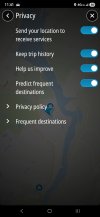
yes. i sent TT dev ticket this morning octoner 7th 9 AM eastern. lets give them a few days. can u also make sure privacy is all ON? see attachment. i will reply when i get info from TT devThis bug lives since last year (at least) but up to winter 2025 update it was possible to start the application if TomTom account was logged out, MyDrive sync. was off - just traffic info could be on (it was described here, also by me workaround). But after mentioned update this workaround hasn't worked any more. What you have observed here (off-line start) was sometimes possible - after proper start on-line it was possible to start app. off-line for some time (not very long) despite of any settings in application. So for now we can just wait for fix...
Attachments
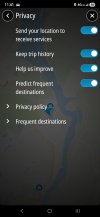
Yes - all my privacy settings are onyes. i sent TT dev ticket this morning octoner 7th 9 AM eastern. lets give them a few days. can u also make sure privacy is all ON? see attachment. i will reply when i get info from TT dev
ok Great. By the way, i just received another update that's not related to this ticket. I'm in the United States and when I take interstate and my next turn is the exit, the green panel on the Android auto car screen only shows the town and the arrow of the exit but the car screen does not show the exit number itself. For example Exit 138 or 130 Etc... however if you open the app on the smartphone the green panel on the top does show the exit number. So I have some good news. The developer will add the exit number to the car screen to show on the car screen green panel the exit number itself. This will be done with the next update of the app itself from the Play Store. They're still working on the stock at loading maps with poor internet connection or no internet connection at all. I'm a little bit puzzled because if I put my smartphone in the airplane mode it opens up fine and when my smartphone on the internet connection with five bars it also opens up fine. However when there is only one bar or no bars the smartphone app and the Android auto car screen app you stuck at loading MapsYes all 4 buttons are on
ok Great. By the way, i just received another update that's not related to this ticket. I'm in the United States and when I take interstate and my next turn is the exit, the green panel on the Android auto car screen only shows the town and the arrow of the exit but the car screen does not show the exit number itself. For example Exit 138 or 130 Etc... however if you open the app on the smartphone the green panel on the top does show the exit number. So I have some good news. The developer will add the exit number to the car screen to show on the car screen green panel the exit number itself. This will be done with the next update of the app itself from the Play Store. They're still working on the stock at loading maps with poor internet connection or no internet connection at all. I'm a little bit puzzled because if I put my smartphone in the airplane mode it opens up fine and when my smartphone on the internet connection with five bars it also opens up fine. However when there is only one bar or no bars the smartphone app and the Android auto car screen app you stuck at loading Maps
Until TomTom modifies the app, the offline maps option will not work.
What you can do is launch the app online, and once launched, disconnect your phone from mobile data.
update from tt.Until TomTom modifies the app, the offline maps option will not work.
What you can do is launch the app online, and once launched, disconnect your phone from mobile data.
|
update from tt:Yes all 4 buttons are on
7 Oct 2025, 20:15 CEST
Thank you for updating your incident .
Thank you very much for sharing the detailed video and explanation. I really appreciate the time and effort you took to record and describe the issue so clearly.
I’ve shared the full video with our development team and asked them to review it in its entirety, as you mentioned, so they can fully understand the connection you’ve highlighted.
From our initial review, it appears that the app may occasionally fail to launch when the mobile network is extremely weak. In such cases, Android reports that a data connection is available, but the app cannot properly connect to our servers, which causes it to freeze on the loading screen.
As a temporary workaround, please try this:
- Turn on Flight Mode (or disable mobile data) before opening the app.
- Once the app launches, you can turn Flight Mode off again if you’d like to use live services like Traffic or Search.
Our development team is aware of this behavior and is looking into improving how the app handles poor network conditions in a future update.
update from tt:This bug lives since last year (at least) but up to winter 2024/2025 (February as I remember...) update it was possible to start the application if TomTom account was logged out, MyDrive sync. was off - just traffic info could be on (it was described here, also by me workaround). But after mentioned update this workaround hasn't worked any more. What you have observed here (off-line start) was sometimes possible - after proper start on-line it was possible to start app. off-line for some time (not very long) despite of any settings in application. So for now we can just wait for fix...
7 Oct 2025, 20:15 CEST
Thank you for updating your incident .
Thank you very much for sharing the detailed video and explanation. I really appreciate the time and effort you took to record and describe the issue so clearly.
I’ve shared the full video with our development team and asked them to review it in its entirety, as you mentioned, so they can fully understand the connection you’ve highlighted.
From our initial review, it appears that the app may occasionally fail to launch when the mobile network is extremely weak. In such cases, Android reports that a data connection is available, but the app cannot properly connect to our servers, which causes it to freeze on the loading screen.
As a temporary workaround, please try this:
- Turn on Flight Mode (or disable mobile data) before opening the app.
- Once the app launches, you can turn Flight Mode off again if you’d like to use live services like Traffic or Search.
Our development team is aware of this behavior and is looking into improving how the app handles poor network conditions in a future update.
Their solution doesn't make sense. I have no SIM card in my tablet and WiFi is switched off. TT doesn't start. With WiFi it starts.
So there is no WEAK network connection as there is no connection at all.
But for fun I turned on flight mode and it doesn't start.
So there is no WEAK network connection as there is no connection at all.
But for fun I turned on flight mode and it doesn't start.
Hmm. That's puzzling even more. THe concept that TomTom explained to me is: When u open tomtom, TT app looks for server connection to internet to give you traffic, road incidents etc... from TT server. However when there is NO internet connection at all (your case) - TomTom will search for DOWNLOADED MAPS inside your hard drive device, and then open (this occurs fairly quickly). So: My impression is that: your downloaded maps ARE NOT seen by tomtom app when your WiFi is OFF (when u have zero access to internet). Did you download TT Apps onto the native hard drive or SD CARD? (don't download to sd card or anything external. only download to native hard drive). If you downloaded TT apps maps to native hard drive, can you delete downloaded maps now, and then RE-download the country again and also download surrounding countries just in-case, and see if TT will open up when your wifi is OFF (when you have zero internet connex) - see if App will pull maps from the download itself on hard drive (make sure your downloaded maps are NOT on your SD CARD nor anything external. ONLY download maps to the native hard drive). Let me know. EDIT: Go into PERMISSIONS and make sure Permission for PHOTOS AND VIDEO is on ALWAYS ALLOW ALL. (not allow limited access as you most likely have Allow Limited Access mistakenly set and TT can't pull maps from the download. Make sure double check that ALWAYS ALLOW ALL permission is set in Photos and Videos Permissions of TT).Their solution doesn't make sense. I have no SIM card in my tablet and WiFi is switched off. TT doesn't start. With WiFi it starts.
So there is no WEAK network connection as there is no connection at all.
But for fun I turned on flight mode and it doesn't start.
Last edited:
It was long time ago when this workaround worked - it was actually the first step of getting things worse. There was a huge thread on it: https://www.tomtomforums.com/thread...go-nav-app-without-internet-connection.34889/ . Since February 2025 no workaround are possible. @pesik90 - I've try really a lot of things to get it working - all possible workarounds, resetting/reloading application, redownloading maps (I mostly have all countries downloaded - and my homeland has just one map). Also for sure it is not the problem of access to maps (I even don't have SD card in my phone...) once we have got serious partial network down in Europe (many services were unavailable - as I remember it was serious DNS problem) and guess what - I had normal access to internet in Poland for Polish, local services but still I couldn't start TomTomGo application - so I assume application during start tries to connect to some strange on-line services (vide thread and problems of people with VPNs) for some reason - and if You try to start application shortly after proper on-line start it is even possible to start it off-line (probably this internet connection is not required on every start but rather on some period of time or is not required if some process is still in memory... but these are just speculations).
please dont give up. give tomtom a chance to fix. i think tomtom is very short staffed so it takes time. the user interface of TT and nav is The Best in this market. let me know tomorr if deleting and reinstalling worked. Make sure Photos and Videos Permiasion is allow allWill try tomorrow but then giving up
Ask a Question
Want to reply to this thread or ask your own question?
You'll need to choose a username for the site, which only take a couple of moments. After that, you can post your question and our members will help you out.
Similar Threads
Staff online
-
 NiallModerator

Forum statistics
Latest Threads
-
Tomtom support leaves a lot to be desired
- Started by Kotku
-
Does TomTom support actually exist?
- Started by LostinTheWilderness
-
Confused about TomTom apps
- Started by BarkingMad
-
GO Expert Car subscription
- Started by Bauble7596
-
Mapshare issues still pending since november last year and april this year.
- Started by mldavis
-
Using a TT with a bad battery?
- Started by FWS
-
Go Exclusive 7inch
- Started by Tomtommad
-
Tom by TomTom, for logging?
- Started by And
-
Go 520 stuck in Connected - Disconnected Bluetooth loop
- Started by Steve10250
-
TomTom Free App Destination Database Errors
- Started by Mark25