Rider 500 USB Cable

Joined
May 5, 2026
Messages
16
Country
<img src="/styles/default/custom/flags/fi.png" alt="Finland" /> Finland
TomTom Model(s)
Rider 550, TomTom Go Expert, TomTom app
In addition to the 550, I have an older Rider 500 navi, which is not WLAN. Otherwise it works fine. The problem today is that I no longer have any computers that I can connect a USB A cable to. They all have USB C ports. I could still use that Rider 500 Navi, for example as a spare, but updating it is starting to be impossible. As far as I understand, TomTom does not accept any USB cable other than the original one purchased from TomTom. There is no cable that can be connected to the USB C port in the range. Are there any plans to manufacture such a USB cable or is there any advice on how to continue using that older Navi?
 
In addition to the 550, I have an older Rider 500 navi, which is not WLAN. Otherwise it works fine. The problem today is that I no longer have any computers that I can connect a USB A cable to. They all have USB C ports. I could still use that Rider 500 Navi, for example as a spare, but updating it is starting to be impossible. As far as I understand, TomTom does not accept any USB cable other than the original one purchased from TomTom. There is no cable that can be connected to the USB C port in the range. Are there any plans to manufacture such a USB cable or is there any advice on how to continue using that older Navi?
The Rider 500 can also be updated via Wi-Fi, just like the Rider 550. I don't see what the problem is?
 
Yes, the Rider 410 doesn't have Wi-Fi.

I don't know if it would work, but there are USB-A to USB-C adapters available.

1778062170333.jpeg
 
If you use adapters, TomTom will not accept it. The original cable must be connected directly to the computer. If there is an adapter in between, it is interpreted that it is not the original cable.
 
Your GPS can be connected to a computer, even if it is not an original TomTom cable.
 
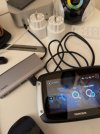
I tried again. I've done this before. MyDrive Connect doesn't recognize the device, through any intermediary. Only when the original cable is plugged directly into the computer port. Does anyone have experience that it works?
 

Attachments

  • IMG_0567.jpg
    IMG_0567.jpg
    341.1 KB · Views: 20
That's odd, I have a non-original TomTom cable and it works perfectly.

Your cable should have four wires: two for charging and two for data transfer.

In the photo, your GPS isn't plugged directly into your computer's USB port, which is why it's not being recognized.
 
That's odd, I have a non-original TomTom cable and it works perfectly.

Your cable should have four wires: two for charging and two for data transfer.

In the photo, your GPS isn't plugged directly into your computer's USB port, which is why it's not being recognized.
That adapter is the same as the previously suggested adapters. Just more ports. But OK, I'll try it directly from the USB port with the accessory cable. I doubt it will work because I remember trying it before.
 
Using external adapters, a USB hub, or a USB port on the keyboard or monitor may cause a connection problem.

1778157797510.jpeg
 
Now connected directly to the computer with the accessory cable. My Drive Connect still does not recognize the device. (Did this before) But when connected to a computer with a USB A port with the original cable, it works.
 

Ask a Question

Want to reply to this thread or ask your own question?

You'll need to choose a username for the site, which only take a couple of moments. After that, you can post your question and our members will help you out.

Ask a Question

Members online

No members online now.

Latest resources

Forum statistics

Threads
30,248
Messages
208,103
Members
70,055
Latest member
Kotku

Latest Threads

Back
Top