GO Professional 520 Traffic no longer connects via Pixel 7 after MyDrive app discontinuation

Joined
Jul 30, 2023
Messages
15
Country
<img src="/styles/default/custom/flags/it.png" alt="Italy" /> Italy
TomTom Model(s)
tomtom go professional 520
Hello,


I have a TomTom GO Professional 520 and a Google Pixel 7. TomTom Traffic worked correctly for years through the Bluetooth connection with this same phone, but recently it stopped working.


The situation is as follows:


  • TomTom GO Professional 520 firmware is updated: 24.102.0003.411 (07/05/2024).
  • Europe Truck map is updated: v1170.13192, published 03/2026.
  • Traffic and Speed Cameras subscriptions both show Activated.
  • The device is correctly logged into my TomTom account.
  • The device connects normally to my home Wi-Fi and downloads updates.
  • My Google Pixel 7 has a working Internet connection.
  • Bluetooth pairing works and hands-free calling shows Connected.
  • Bluetooth tethering is enabled on the Pixel 7.
  • I deleted the pairing from both devices, restarted both devices and paired them again from scratch.

However, under:


Settings → Bluetooth → Pixel 7


I still see:


Data for Traffic and other services – Unable to connect


The old MyDrive EU 2.20.0 app can no longer log in and incorrectly displays:


“No Internet connection. Check your network settings.”


Internet is working normally, and I can log in successfully through plan.tomtom.com, where all my saved places are visible. I have also cleared the MyDrive cache and app data, without any change.


The Traffic service used to work with this exact TomTom and this exact Pixel 7, so something appears to have changed recently.


Has anyone experienced the same issue with a GO Professional 520 and a Pixel 7 / recent Android version?


Is there a current procedure to restore TomTom Traffic after the MyDrive mobile app was discontinued?


Do I need to use Bluetooth tethering only, a Wi-Fi hotspot, or perform a factory reset of the GO Professional 520?


I would prefer not to perform a factory reset unless it is confirmed to be necessary.


Thank you.
 
As you know, the MyDrive app has been discontinued.

To connect to the TomTom service, you must use exclusively Bluetooth tethering or a Wi-Fi hotspot.


If you have created an account on Plan-Tomtom, you can perform a factory reset without any issues.
You will find your favorites again the next time you log in.
 
Willy thank you for your reply.

Bluetooth tethering is already enabled on my Pixel 7 and the GO Professional 520 is correctly paired with the phone.

The device still does not receive TomTom Traffic.

Before performing a factory reset, could you please confirm whether the GO Professional 520 should currently receive Traffic over Bluetooth tethering on the latest firmware?

Or is there a known issue affecting this model after the MyDrive app was discontinued?
 
file_00000000498c820a9758cc898deb5267.jpg

I tested both Bluetooth tethering and Wi-Fi hotspot from my Pixel 7.


The GO Professional 520 connects successfully to the Pixel 7 Wi-Fi hotspot and has Internet access.


However, under Bluetooth settings it still reports:


"Traffic and other services: Unable to connect."


Please see the attached photo.


Since Internet connectivity is working, do you still recommend a factory reset, or does this indicate a firmware or server issue?
 
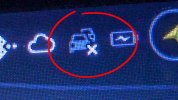
At the top of your GPS, there are two cars. Is there a cross on the car icon?
 
At the top of your GPS, there are two cars. Is there a cross on the car icon?
Yes, there is a cross on the two-car icon. As shown in the attached photo, TomTom Traffic is not connected. When Traffic works correctly, the cross disappears and the icon changes slightly. The cross remains even though the GO Professional 520 has Internet access through the Pixel 7 Wi-Fi hotspot
 

Attachments

  • 1000051394.jpg
    1000051394.jpg
    302.9 KB · Views: 8
Your GPS is not connected to the TomTom server.

Try connecting it again by following this FAQ.

 
Your GPS is not connected to the TomTom server.

Try connecting it again by following this FAQ.

Thank you.
I have already gone through the FAQ and checked all the required points.
My GO Professional 520 successfully connects to both my Pixel 7 Wi-Fi hotspot and my home Wi-Fi (FRITZ!Box 7690). It also downloads updates correctly and I am signed in to my TomTom account.
Despite this, the two-car icon still shows the cross and TomTom Traffic never connects.
Since the device already has Internet access and can communicate with TomTom for updates, what additional step could prevent it from connecting specifically to the TomTom Traffic server?
 
Could there be a connection issue with the server, given that you say the phone was working before?

Because if your GPS is connected to your home Wi-Fi, the "X" on the car icon should disappear.

Could you try sending a favorite to yourself from TomTom Maps and check if it arrives on the GPS?
 
Could there be a connection issue with the server, given that you say the phone was working before?

Because if your GPS is connected to your home Wi-Fi, the "X" on the car icon should disappear.

Could you try sending a favorite to yourself from TomTom Maps and check if it arrives on the GPS?
I completed the test.
I saved “La Piazza Duomo, Biella” three times by mistake on Plan.TomTom.com.
All three saved places appeared correctly on my GO Professional 520.
Therefore, the device is connected to my TomTom account and cloud synchronization is working correctly.
However, TomTom Traffic still does not connect and the cross remains on the two-car icon.
Since cloud synchronization works, does this indicate a specific problem with the Traffic service or with the Traffic entitlement for my device?
 
That's strange.
In the Settings, could you check if sending information to TomTom is enabled?
I checked the TomTom account settings.
The device is correctly signed in as xxxxxxx(e-mail address removed) and cloud synchronization is working.
My favorites synchronize correctly between Plan.TomTom.com and the GO Professional 520.
Therefore:
Internet connection works.
TomTom account authentication works.
Cloud synchronization works.
The only service that never connects is TomTom Traffic, and the two-car icon still shows the X.
Could you please check whether the Traffic entitlement for my GO Professional 520 is active on the TomTom server, or if there is a known server-side issue?


Email address removed to prevent spam.
 
Last edited by a moderator:
Agreeing to send information to TomTom and being logged into your account are two different things.
 
Agreeing to send information to TomTom and being logged into your account are two different things.
I checked the privacy settings.
All TomTom data sharing options are already enabled.
My GO Professional 520 shows:
Traffic subscription: Activated
Traffic service: Subscribed
TomTom account connected
Cloud synchronization working
However, the two-car icon still shows the X and TomTom Traffic never connects.
Since the subscription is active and all privacy permissions are enabled, could you please check whether there is a problem with the Traffic service on the server side for my device?
 
In my opinion, you should contact TomTom support so they can check what's happening with your account.
 
I tried to contact TomTom Support through the official Live Support chatbot.
Unfortunately, the system reports that it is experiencing technical issues and remains stuck in a loop: it asks me to select my GO Professional 520, then returns to the same product-selection screen without opening a ticket or connecting me to an agent.
Could you please provide me with the exact email address or another official method to contact TomTom Support and open a technical ticket?
 
Hi Willy,


I followed your advice and tried to contact TomTom Support through the official Live Support chatbot.


Unfortunately, the chatbot is stuck in an endless loop.


No matter what I type ("human agent", "live agent", "technical support", or a detailed description of my problem), it always returns to the same screen asking:


"Which product would you like support with?"


I select TomTom GO Professional 520, then it immediately returns to the same question again. It never opens a ticket and never connects me to a human support agent.


Since I cannot contact TomTom Support because of this loop, could you please provide:


  • the direct email address for TomTom Technical Support, or
  • another official way to open a technical support ticket?

Thank you very much.
 
Hi Willy,


I have another update.


I also checked the "Support tickets" section of my TomTom account. It only displays my previous tickets and there is no option to create a new one.


The official Live Support chatbot is still stuck in an endless loop, so at the moment I have no way to open a new technical support request.


Could you please tell me if there is another official way to contact TomTom Technical Support, or provide the direct email address?


Thank you.
 
During business hours, this is the option offered to me when I try to contact support.

1785763986506.jpeg


Outside of business hours, I am offered the option to contact them via email.
 
Hi Willy,
I tried again during business hours. The chatbot correctly recognizes my GO Professional 520, but immediately displays:
“We are currently experiencing some technical issues.”
It then stops and does not offer the options to speak with customer support or a human agent. Selecting the product again only restarts the same loop.
I am attaching the screenshot. Is there a direct official email address, or could you tell me how to obtain the email-contact option you mentioned?
1000051912.png
 

Ask a Question

Want to reply to this thread or ask your own question?

You'll need to choose a username for the site, which only take a couple of moments. After that, you can post your question and our members will help you out.

Ask a Question

Members online

No members online now.

Latest resources

Forum statistics

Threads
30,327
Messages
208,891
Members
70,200
Latest member
Dejan09

Latest Threads

Back
Top