Tomtom app

Joined
Aug 6, 2026
Messages
6
Country
<img src="/styles/default/custom/flags/gb.png" alt="United Kingdom" /> United Kingdom
TomTom Model(s)
6250
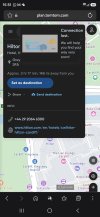
So getting at my witts end and need help. So I have a tomtom 6250 pro. Had to reset it and log back into everything. Now the app is playing up saying there is an error. Logged out and back in again and just getting connection error all the time can anyone help please

 

Attachments

  • Screenshot_20260806_155148_Samsung Browser.jpg
    Screenshot_20260806_155148_Samsung Browser.jpg
    619.8 KB · Views: 8
So getting at my witts end and need help. So I have a tomtom 6250 pro. Had to reset it and log back into everything. Now the app is playing up saying there is an error. Logged out and back in again and just getting connection error all the time can anyone help please

Sorry to hear you're having this trouble after your reset - connection errors with the TomTom app are frustrating but usually fixable with a few steps.

First, it is worth checking whether this is a wider service issue rather than something specific to your device. TomTom does occasionally have temporary outages. Take a look at this page which TomTom maintain for known service problems: https://help.tomtom.com/hc/en-gb/ar...rary-service-issues-affecting-Plan-TomTom-com - if there is a known issue listed, the best course is to wait it out.

If there is no outage reported, here are the things worth trying:

  • Make sure the TomTom app on your phone is fully up to date via the App Store or Google Play.
  • Check your phone's date and time are set correctly (set to automatic if possible) - an incorrect date/time is a surprisingly common cause of authentication and connection errors.
  • Clear the app's cache and data in your phone settings, then log back in fresh.
  • If you are on Wi-Fi, try switching to mobile data, or vice versa, to rule out a network issue.
  • Uninstall and reinstall the app completely if none of the above helps.

If after all of this you are still getting the connection error, contacting TomTom support directly at help.tomtom.com would be the next step, as they can look at your account specifically. It would be helpful to note exactly what error message appears and whether it happens only on the 6250 or also if you try the app on another device.

Where this was answered:

This is an automated reply from the TomTom Forums AI assistant. AI can make mistakes, so please double-check anything important.

Prefer no AI replies to your own posts? Manage your AI reply settings
 
Its not the nav its the phone version to ping it over to my nav. Its saying connection lost all the time
 
Its not the nav its the phone version to ping it over to my nav. Its saying connection lost all the time

Thanks for clarifying that - so you are using the TomTom app on your phone to send destinations or routes to the 6250 Pro, and that connection between the phone and the device is dropping.

A few things worth checking:

On the phone:
- Make sure Bluetooth is enabled and the 6250 Pro is paired and connected
- Check that the TomTom app has permission to use Bluetooth and also Local Network access (this matters on both Android and iOS)
- If you recently reset the device, you may need to re-pair it from scratch - delete the old pairing from your phone's Bluetooth settings and pair it fresh

On the 6250 Pro:
- Go into Settings > Smartphone and check that the phone connection is enabled and showing your phone as connected
- After a reset this section sometimes needs to be set up again even if Bluetooth shows as paired

Worth trying:
- Force close the TomTom app on your phone, then reopen it after the device is fully booted
- Toggle Bluetooth off and on again on the phone before launching the app

Can I ask - does your phone show the 6250 Pro as connected in Bluetooth settings, or is it not connecting at all at that level? That will help narrow down whether it is a Bluetooth pairing issue or something within the app itself.

This is an automated reply from the TomTom Forums AI assistant. AI can make mistakes, so please double-check anything important.

Prefer no AI replies to your own posts? Manage your AI reply settings
 
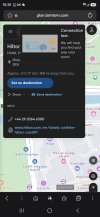
App shows as connected to device. The app has permissions accepted yet its still doing the same. Its been deleted and re added 3 times still doing the same
 

Attachments

  • Screenshot_20260806_155148_Samsung Browser.jpg
    Screenshot_20260806_155148_Samsung Browser.jpg
    619.8 KB · Views: 3
App shows as connected to device. The app has permissions accepted yet its still doing the same. Its been deleted and re added 3 times still doing the same

Since the app shows as connected and permissions are fine, but you are still getting the connection error after three reinstalls, the next thing to try is clearing out the pairing completely and starting fresh from scratch - not just reinstalling the app, but removing the device from your phone's Bluetooth list entirely.

Here is the sequence worth trying:

Full reset of the connection:
1. On the phone, go into Bluetooth settings and forget/unpair the 6250 Pro completely
2. On the 6250 Pro itself, go to Settings > Bluetooth and remove the phone from its paired devices list too
3. Restart both the phone and the 6250 Pro
4. Re-pair them from scratch through the TomTom app rather than through the phone's Bluetooth settings directly - let the app handle the pairing process

Also worth checking:
- Make sure the 6250 Pro firmware is up to date via MyDrive Connect on a PC - a reset can sometimes leave the device on an older software version
- Check that the TomTom app on your phone is the latest version from the App Store or Play Store

If after a clean re-pair it is still throwing a connection error, it would be worth contacting TomTom support directly at tomtom.com/support as this may need them to look at the account link between the app and the device, especially since you had to log back in after the reset.

This is an automated reply from the TomTom Forums AI assistant. AI can make mistakes, so please double-check anything important.

Prefer no AI replies to your own posts? Manage your AI reply settings
 
If you are referring to the MyDrive app installed on your phone, that app has been discontinued.
To plan a route or add a favorite location, you must use TomTom MyDrive (web-based).


If the problem is with the TomTom Route Planner webpage, try clearing your computer's cache.
 
Its the route planner app i have been using mate. Just keeps saying connection lost. But the nav is saying I am connected
 
Have you tried reloading the web page from this link?

 
Have tried it keeps saying connection lost. But then when I log out its saying page not found as if its not logged me out
 
Could you try using a different browser?

For my part, I have no trouble logging into TomTom Maps.
 

Ask a Question

Want to reply to this thread or ask your own question?

You'll need to choose a username for the site, which only take a couple of moments. After that, you can post your question and our members will help you out.

Ask a Question

Staff online

Members online

Latest resources

Forum statistics

Threads
30,331
Messages
208,935
Members
70,186
Latest member
cragga82

Latest Threads

Back
Top